Java String and Wrapper Comparison Cheat Sheet
The Golden Rule
== | .equals() | |
|---|---|---|
| Compares | References (same object?) | Content, if the class overrides it |
| On primitives | Compares values | Not available |
| Use it for | Checking identity, or comparing primitives | Comparing objects such as String and Integer |
Compare objects with
.equals(), unless you really want to know whether two references point to the same object.
This sheet covers every way an exam can compare primitives and references: strings, wrapper classes, null, and mixed comparisons. All results were checked by running the code on Java 21.
Key Ideas (Read These First)
1. Variables hold references, not objects
- A primitive variable (
int x = 5;) stores the value itself. - A variable of a class type (
String,Integer, your own class) stores a reference: the address of an object that lives on the heap. The variable is not the object. - Assigning one reference to another (
b = a;) copies the address, not the object. Both now point to the same object.
String a = new String("hi");
String b = a;                 // same object as a
String c = new String("hi");  // a different object with the same text
// a == b  →  true     a == c  →  false     a.equals(c)  →  true
So == asks “are these the same object?”, and equals() asks “do these objects hold the same content?”.
2. What equals() does
equals() is a method that every object has. The version in Object behaves like ==. Some classes override it to compare content:
| Class | equals() compares |
|---|---|
String, Integer, Double and other wrappers | Content (value) |
Your own class, if you do not override equals() | References, just like == |
Your own class, if you override equals() | Whatever you write (usually the fields) |
class P { int x; P(int x) { this.x = x; } }
new P(1).equals(new P(1));   // false: default equals() is the same as ==
If you override equals(), also override hashCode(), so equal objects have equal hash codes.
3. Strings are immutable
Once a String is created, it can never change. Methods such as concat() or toUpperCase() return a new string and leave the original alone.
String s = "hi";
s.concat(" there");              // the new string is thrown away
System.out.println(s);           // hi
s = s.concat(" there");          // keep the result by assigning it
System.out.println(s);           // hi there
Because a string can never change, Java can safely let many variables share one string object. That is the idea behind the string pool.
4. The String Constant Pool
The String Constant Pool is a special area of the heap where Java keeps one copy of each string literal.
- When your code uses the literal
"hi", Java looks in the pool. If"hi"is already there, it reuses that object. If not, it adds it. - So
String s1 = "hi"; String s2 = "hi";gives two variables pointing at one pooled object. new String("hi")always creates a new object outside the pool, even if"hi"is already pooled.intern()returns the pooled version of a string, adding it to the pool if needed.
5. Boxing, unboxing and the wrapper cache
Every primitive type has a wrapper class: int → Integer, double → Double, char → Character, and so on.
- Boxing turns a primitive into an object:
Integer a = 100;. The compiler writesInteger.valueOf(100)for you. - Unboxing turns the object back into a primitive:
int b = a;. The compiler writesa.intValue()for you. Integer.valueOf()keeps a cache ofIntegerobjects for small values. Boxing the same small value twice returns the same object. For other values, it creates a new object each time.
This is why == on two Integer objects is true for 100 and false for 200. The cache is only a memory optimisation, so never rely on == for wrapper objects. Use .equals().
6. Unboxing null throws an exception
Unboxing means calling a method such as intValue() on the wrapper object. If the wrapper variable is null, there is no object to call it on, so Java throws a NullPointerException at run time. The code compiles without any warning.
Integer a = null;
int b = a;          // NullPointerException (unboxing null)
Unboxing happens silently whenever a wrapper meets a primitive: in assignments, in == with a primitive, in arithmetic, in if (Boolean), and in ?: expressions. Full cases are in section 5.
1. Strings
Now the key ideas in action. Literals live in the String Constant Pool, where the same literal is stored once and shared. new String(...) always creates a separate object outside the pool.
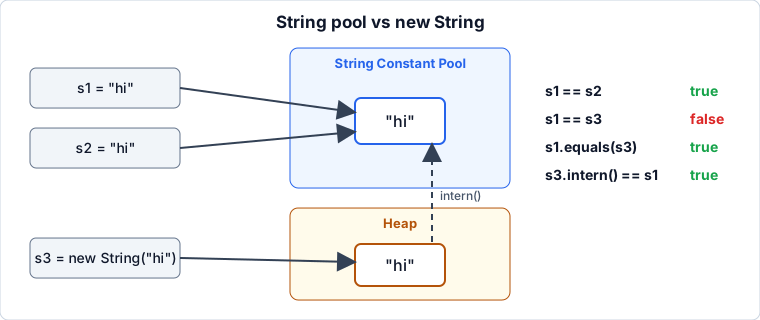
| Code | s1 == s2 | s1.equals(s2) | Why |
|---|---|---|---|
s1 = "hi"; s2 = "hi"; | true | true | Both point to one pooled object |
s1 = new String("hi"); s2 = "hi"; | false | true | s1 is a new object, s2 is the pooled one |
s1 = new String("hi"); s2 = new String("hi"); | false | true | Two separate objects |
s1 = new String("hi"); s2 = "hi"; then s1.intern() == s2 | true | true | intern() returns the pooled reference |
Concatenation
| Code | == "hello" | Why |
|---|---|---|
"hel" + "lo" | true | Compile-time constant, resolved to the pooled string |
final String p = "hel"; p + "lo" | true | p is a constant variable, so it is still a constant expression |
String p = "hel"; p + "lo" | false | Computed at run time, so a new object is created |
(p + "lo").intern() | true | intern() gives the pooled string |
Useful methods
| Method | Result | Note |
|---|---|---|
"Java".equalsIgnoreCase("JAVA") | true | Ignores case |
"Java" == "JAVA" | false | Different strings |
"x".equals(null) | false | Safe |
s.equals("x") when s is null | NullPointerException | Put the literal first: "x".equals(s) |
"a".contentEquals(sb) | true for equal text | Compares a String with a StringBuilder |
compareTo()
It compares characters one by one (Unicode values) and returns:
- The difference of the first characters that differ, or
- The difference in length if one string is a prefix of the other.
| Call | Result | Meaning |
|---|---|---|
"apple".compareTo("banana") | -1 | 'a' − 'b', so first comes before second |
"b".compareTo("a") | 1 | First comes after second |
"apple".compareTo("apple") | 0 | Equal |
"abc".compareTo("abcde") | -2 | Prefix, so length difference 3 − 5 |
"Java".compareTo("JAVA") | 32 | 'a' (97) − 'A' (65); uppercase sorts first |
"Java".compareToIgnoreCase("JAVA") | 0 | Ignores case |
In an exam, rely on the sign (negative, zero, positive). The exact number is only the character difference.
2. Integer and the Cache
Autoboxing (Integer a = 100;) calls Integer.valueOf(), which reuses cached objects for values from -128 to 127. Outside that range, each boxing creates a new object, so == compares two different references.
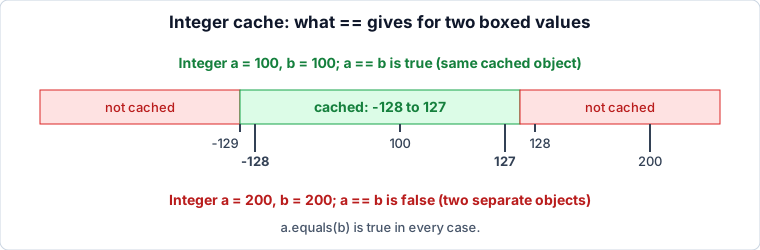
| Code | a == b | a.equals(b) |
|---|---|---|
Integer a = 100, b = 100; | true | true |
Integer a = 127, b = 127; | true | true |
Integer a = 128, b = 128; | false | true |
Integer a = 200, b = 200; | false | true |
Integer a = -128, b = -128; | true | true |
Integer a = -129, b = -129; | false | true |
new Integer(100) twice | false | true |
Integer.valueOf(100) twice | true | true |
Integer.valueOf(200) twice | false | true |
new Integer(...)is deprecated (marked for removal in newer Java versions). UseInteger.valueOf().
Why -128 to 127?
- These are the small values programs use most often, and they match the range of a
byte. Java promises to reuse the same object for them, which saves memory and time. - Java does not promise anything outside this range, so the result of
==there is effectively alwaysfalsefor separately boxed values. - The upper limit of the
Integercache can be raised with the JVM option-XX:AutoBoxCacheMax=<n>. We checked that with-XX:AutoBoxCacheMax=500,Integer a = 200, b = 200; a == bbecomestrue, while 1000 is stillfalse. The lower limit stays at -128. - Exam answer: assume -128 to 127, and never rely on
==for wrapper objects.
Mixed comparisons
| Code | Result | Why |
|---|---|---|
Integer a = 200; int b = 200; a == b | true | a is unboxed, so values are compared |
Integer.valueOf(200).equals(200) | true | 200 is autoboxed to Integer |
Integer.valueOf(1).equals(1L) | false | Different classes: Long is not an Integer |
Integer i = 1; Long l = 1L; i == l | compile error | incomparable types: Integer and Long |
3. All Wrapper Classes
| Class | == is true for equal values when | Not guaranteed when |
|---|---|---|
Integer | -128 to 127 | Outside that range (the upper limit can be raised with a JVM option) |
Short | -128 to 127 | Outside that range |
Long | -128 to 127 (in practice) | Outside that range |
Byte | Always (every byte value is cached) | new Byte(...) |
Character | '\u0000' to '\u007f' (0 to 127) | Above 127 |
Boolean | Always, when autoboxed or Boolean.valueOf() | new Boolean(...) |
Double | Never (no cache) | Always false for separate boxes |
Float | Never (no cache) | Always false for separate boxes |
.equals() compares the value for all of them, and also requires the same class.
Why Double and Float have no range
- A cache only makes sense for a small set of common values. Whole numbers from -128 to 127, the 128
Charactercodes, andtrue/falsefit that idea. doubleandfloathave no such small set: there are billions of possible values, and no values that are “most common”. SoDouble.valueOf()andFloat.valueOf()always create a new object.- Result: two separately boxed doubles are never
==, whatever the value (1.0,0.0, anything). - The only way two
Doublevariables are==is when they hold the same reference:
Double a = 1.0, b = 1.0;
a == b;                  // false: two different objects
Double c = a;
a == c;                  // true: same reference
a.equals(b);             // true: same value
Special cases
| Case | Result |
|---|---|
Double d1 = 1.0, d2 = 1.0; d1 == d2 | false |
Double d1 = 1.0, d2 = 1.0; d1.equals(d2) | true |
double n = Double.NaN; n == n | false (primitive) |
Double.valueOf(Double.NaN).equals(Double.NaN) | true |
0.0 == -0.0 | true (primitive) |
Double.valueOf(0.0).equals(-0.0) | false |
4. Primitive Comparisons
== on primitives compares values. When the two sides have different types, the smaller one is widened first: byte → short → int → long → float → double, and char → int.
| Code | Result | Why |
|---|---|---|
int i = 10; long l = 10L; i == l | true | i is widened to long |
'a' == 97 | true | A char is its Unicode number |
5 == 5.0 | true | 5 is widened to double |
5 / 2 == 2.5 | false | 5 / 2 is integer division, which gives 2 |
0.1 + 0.2 == 0.3 | false | Floating-point rounding: the sum is slightly different from 0.3 |
float f = 0.1f; f == 0.1 | false | 0.1f is widened to a double, which is not the same value as 0.1 |
0.5f == 0.5 | true | 0.5 can be stored exactly in binary |
(byte) 200 | -56 | A byte holds -128 to 127, so 200 wraps around |
double n = Double.NaN; n == n | false | NaN is not equal to anything, even itself |
0.0 == -0.0 | true | Primitives compare as equal |
To compare floating-point results, check the difference against a small tolerance:
Math.abs((0.1 + 0.2) - 0.3) < 1e-9 // trueWrapper compared with primitive
| Code | Result | Why |
|---|---|---|
Integer a = 1000; int b = 1000; a == b | true | The wrapper is unboxed, so values are compared |
Double d = 1.0; double p = 1.0; d == p | true | Same: unboxing |
Long.valueOf(100).equals(100) | false | 100 is boxed as Integer, not Long |
Long.valueOf(100).equals(100L) | true | Both are Long with the same value |
Rule:
wrapper == primitiveunboxes the wrapper and compares values.wrapper == wrappercompares references.
5. null and Unboxing
Unboxing null throws NullPointerException. The code compiles, and fails only at run time.
| Code | Result | Why |
|---|---|---|
Integer a = null; int b = a; | NullPointerException | Assignment unboxes a |
Integer a = null; a == 5 | NullPointerException | 5 is a primitive, so a is unboxed |
Integer a = null, b = null; a == b | true | Both are references, so nothing is unboxed; two nulls are the same |
Integer a = null; a.equals(5) | NullPointerException | Calling a method on null |
Integer.valueOf(5).equals(null) | false | equals(null) is always false |
Boolean f = null; if (f) { } | NullPointerException | The condition is unboxed |
Long l = null; long x = l; | NullPointerException | Assignment unboxes l |
String s = null; s == null | true | == never throws |
String s = null; s.equals("x") | NullPointerException | Calling a method on null |
String s = null; s instanceof String | false | instanceof is false for null |
The ?: trap
Integer n = null;
Integer r = true ? n : 0;     // NullPointerException!
One operand is Integer and the other is int, so Java converts both to int. That unboxes n, even though the result is assigned to an Integer. If both operands are Integer, nothing is unboxed:
Integer n = null, z = 0;
Integer r = true ? n : z;     // r is null, no exception
Safe rules: compare with
nullusing==. Call.equals()on a value that is not null. Check fornullbefore unboxing.
6. Other Comparison Traps
| Case | Result | Note |
|---|---|---|
sb1.equals(sb2) for two StringBuilder("a") | false | StringBuilder does not override equals() |
sb1.toString().equals(sb2.toString()) | true | Compare the text instead |
"a".equals(sb) | false | A String only equals another String |
Object o1 = "hi", o2 = new String("hi"); o1 == o2 | false | The declared type does not matter, only the objects |
Object o1 = "hi", o2 = new String("hi"); o1.equals(o2) | true | equals() is chosen at run time |
"hi".hashCode() == new String("hi").hashCode() | true | Equal strings have equal hash codes |
7. Quick Lookup
| Expression | Result |
|---|---|
"hi" == "hi" | true |
new String("hi") == "hi" | false |
new String("hi").equals("hi") | true |
Integer.valueOf(100) == Integer.valueOf(100) | true |
Integer.valueOf(200) == Integer.valueOf(200) | false |
Integer.valueOf(200).equals(200) | true |
"Java".equalsIgnoreCase("JAVA") | true |
"Java" == "JAVA" | false |
Double a = 1.0, b = 1.0; a == b | false |
Integer a = null; int b = a; | NullPointerException |
0.1 + 0.2 == 0.3 | false |
8. Test Yourself: 45 MCQs
Options: unless the question lists its own options, they are
A) true B) false C) Compilation error D) Runtime exception (NullPointerException)
Questions that print a value list their own options.
Strings
Q1. What is the output?
String a = "Java";
String b = new String("Java");
System.out.println(a == b);
Q2. What is the output?
String a = "hello";
String b = "hel" + "lo";
System.out.println(a == b);
Q3. What is the output?
String a = new String("hi");
String b = new String("hi");
System.out.println(a.equals(b));
Q4. What is the output?
String p = "hel";
String c = p + "lo";
System.out.println("hello" == c);
Q5. What is the output?
final String p = "hel";
String c = p + "lo";
System.out.println("hello" == c);
Q6. What is the output?
String s1 = new String("hi");
String s2 = s1.intern();
System.out.println(s2 == "hi");
Q7. What is printed?
String s = "hi";
s.concat(" there");
System.out.println(s);
A) hi B) hi there C) Compilation error D) null
Q8. What is the output?
String s = null;
System.out.println(s.equals("x"));
Q9. What is the output?
String s = null;
System.out.println(s == null);
Q10. What is the value of "b".compareTo("a")?
A) -1 B) 0 C) 1 D) true
Q11. What is the output?
System.out.println("Java".equalsIgnoreCase("JAVA"));Integer and the cache
Q12. What is the output?
Integer a = 127;
Integer b = 127;
System.out.println(a == b);
Q13. What is the output?
Integer a = 128;
Integer b = 128;
System.out.println(a == b);
Q14. What is the output?
Integer a = -128;
Integer b = -128;
System.out.println(a == b);
Q15. What is the output?
Integer a = Integer.valueOf(200);
Integer b = Integer.valueOf(200);
System.out.println(a.equals(b));
Q16. What is the output? (The constructor is deprecated, but it still compiles.)
Integer a = new Integer(10);
Integer b = Integer.valueOf(10);
System.out.println(a == b);
Q17. What is the output?
Integer a = 200;
int b = 200;
System.out.println(a == b);
Q18. What is the output?
System.out.println(Integer.valueOf(1).equals(1L));Q19. What is the output?
Integer a = 1;
Long b = 1L;
System.out.println(a == b);
Other wrapper classes
Q20. What is the output?
Double a = 1.0;
Double b = 1.0;
System.out.println(a == b);
Q21. What is the output?
Double a = 1.0;
Double b = a;
System.out.println(a == b);
Q22. What is the output?
Long a = 128L;
Long b = 128L;
System.out.println(a == b);
Q23. What is the output?
Character a = 'a';
Character b = 'a';
System.out.println(a == b);
Q24. What is the output? (The constructor is deprecated, but it still compiles.)
Boolean a = new Boolean(true);
Boolean b = true;
System.out.println(a == b);
Q25. What is the output?
Byte a = (byte) 127;
Byte b = (byte) 127;
System.out.println(a == b);
Q26. What is the output?
System.out.println(Double.valueOf(Double.NaN).equals(Double.NaN));Q27. What is the output?
double n = Double.NaN;
System.out.println(n == n);
Q28. What is the output?
System.out.println(Double.valueOf(0.0).equals(-0.0));null and unboxing
Q29. What is the output?
Integer a = null;
int b = a;
System.out.println(b);
Q30. What is the output?
Integer a = null;
System.out.println(a == 5);
Q31. What is the output?
Integer a = null;
Integer b = null;
System.out.println(a == b);
Q32. What is the output?
Integer a = null;
System.out.println(a.equals(5));
Q33. What is the output?
System.out.println(Integer.valueOf(5).equals(null));Q34. What is the output?
Boolean f = null;
if (f) { System.out.println("in"); }
Q35. What is the output?
Integer n = null;
Integer r = true ? n : 0;
System.out.println(r);
Q36. What is the output?
String s = null;
System.out.println(s instanceof String);
Primitives
Q37. What is the output?
int i = 10;
long l = 10L;
System.out.println(i == l);
Q38. What is the output?
System.out.println('a' == 97);Q39. What is the output?
System.out.println(0.1 + 0.2 == 0.3);Q40. What is the output?
float f = 0.1f;
System.out.println(f == 0.1);
Q41. What is the output?
System.out.println(5 / 2 == 2.5);Q42. What is printed?
System.out.println((byte) 200);A) 200 B) -56 C) 56 D) Compilation error
Q43. What is the output?
System.out.println(Long.valueOf(100).equals(100));Q44. What is the output?
Double d = 1.0;
double p = 1.0;
System.out.println(d == p);
Q45. What is the output?
System.out.println(5 == 5.0);Answers and Explanations
Strings
| Q | Answer | Explanation |
|---|---|---|
| 1 | B | The literal is in the pool, and new String creates a separate object, so the references differ |
| 2 | A | "hel" + "lo" is a compile-time constant, so it becomes the pooled "hello" |
| 3 | A | String overrides equals() to compare content |
| 4 | B | p is not final, so the concatenation happens at run time and creates a new object |
| 5 | A | p is a final constant variable, so p + "lo" is a constant expression and is pooled |
| 6 | A | intern() returns the pooled "hi", which is the same object as the literal |
| 7 | A | Strings are immutable. concat() returns a new string that was never stored |
| 8 | D | Calling equals() on a null reference throws NullPointerException |
| 9 | A | == compares references and never throws, so null == null is true |
| 10 | C | 'b' − 'a' is 1 |
| 11 | A | equalsIgnoreCase() ignores case |
Integer and the cache
| Q | Answer | Explanation |
|---|---|---|
| 12 | A | 127 is inside the cache range, so both variables hold the same object |
| 13 | B | 128 is outside the cache, so two separate objects are created |
| 14 | A | -128 is the lowest cached value |
| 15 | A | equals() compares values, whatever the cache does |
| 16 | B | new always makes a new object, while valueOf(10) returns the cached one. A deprecation warning is not an error |
| 17 | A | a is unboxed because b is a primitive, so the values are compared |
| 18 | B | 1L is boxed as Long, and Integer.equals() returns false for any non-Integer |
| 19 | C | Integer and Long are unrelated classes, so == gives “incomparable types” |
Other wrapper classes
| Q | Answer | Explanation |
|---|---|---|
| 20 | B | Double has no cache, so each boxing makes a new object |
| 21 | A | b holds the same reference as a, so the objects are identical |
| 22 | B | Long is cached only from -128 to 127, and 128 is outside it |
| 23 | A | Character caches 0 to 127, and 'a' is 97 |
| 24 | B | new Boolean(true) is a new object, while autoboxing uses the shared Boolean.TRUE |
| 25 | A | Byte caches every possible value |
| 26 | A | Double.equals() treats NaN as equal to NaN |
| 27 | B | For the primitive double, NaN is not equal to anything, even itself |
| 28 | B | Double.equals() tells 0.0 and -0.0 apart, unlike the primitive == |
null and unboxing
| Q | Answer | Explanation |
|---|---|---|
| 29 | D | Assigning to int unboxes a, which calls intValue() on null |
| 30 | D | 5 is a primitive, so a is unboxed, and unboxing null fails |
| 31 | A | Both sides are references, so nothing is unboxed. Two null references are equal |
| 32 | D | Calling equals() on a null reference fails |
| 33 | B | equals(null) always returns false |
| 34 | D | The if condition unboxes the Boolean, and null cannot be unboxed |
| 35 | D | The ?: has an Integer and an int, so both become int. That unboxes n, which is null |
| 36 | B | instanceof is false for null and never throws |
Primitives
| Q | Answer | Explanation |
|---|---|---|
| 37 | A | i is widened to long, and the values are equal |
| 38 | A | A char is promoted to its Unicode number, and 'a' is 97 |
| 39 | B | 0.1 + 0.2 is slightly more than 0.3 because of binary rounding |
| 40 | B | 0.1f is widened to double, which is not the same value as 0.1 |
| 41 | B | 5 / 2 is integer division, giving 2, and 2 == 2.5 is false |
| 42 | B | A byte holds -128 to 127. 200 - 256 = -56 |
| 43 | B | 100 is boxed as Integer, and a Long never equals an Integer |
| 44 | A | d is unboxed because p is a primitive, so the values are compared |
| 45 | A | 5 is widened to 5.0, so the values are equal |
Last-Minute Checklist
-
==compares references,.equals()compares content - Literals share one pooled object, and
new Stringnever does - Constant concatenation is pooled, run-time concatenation is not
-
intern()returns the pooled reference - Wrapper cache is -128 to 127, but
DoubleandFloathave none -
wrapper == primitiveunboxes and compares values - Unboxing
nullthrowsNullPointerException(including in?:andif (Boolean)) -
null == nullistrue, andx.equals(null)isfalse -
Integer.equals(Long)isfalse, andInteger == Longdoes not compile - Floating-point:
0.1 + 0.2 != 0.3, andNaN != NaNfor primitives -
compareTo()returns negative, zero or positive - Write
"literal".equals(variable)to avoidNullPointerException